
Screen Share Privacy For Live Interviews
Your suggested answers stay on your own display, like speaker notes in a presentation. They are not part of the screen you share.
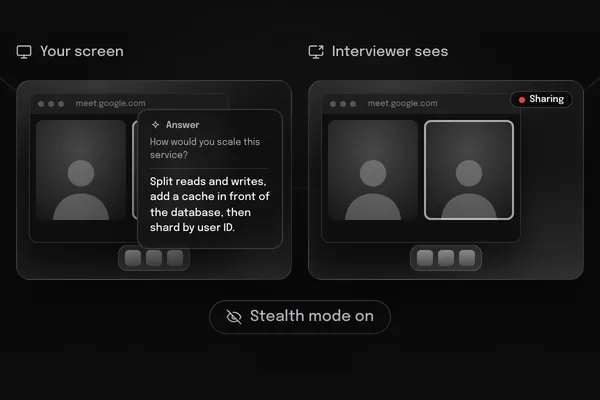
How Screen Share Privacy
Works
01
Your Notes, Your Display
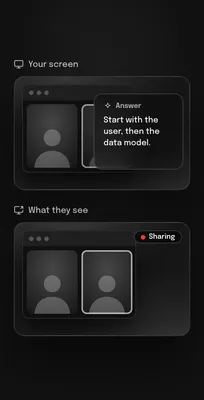
The desktop app keeps its answer window on your own display, the way presenter notes stay on the presenter's screen. Share a window or your whole screen, and your notes are not part of what you share.
02
Hover To Read The Answer
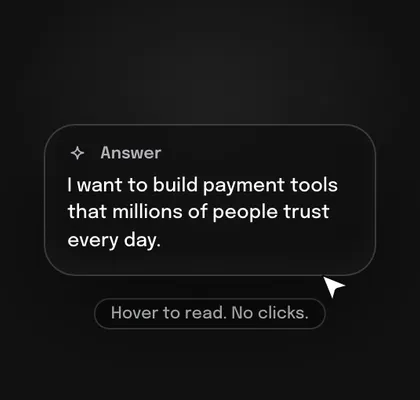
Move your cursor over the answer to bring it forward. No shortcuts to remember and nothing to click while you are talking.
03
Test It Before The Call
Share your screen in a test call with a friend or a second device and look at what the other side sees. Do this once before your first real interview.
04
Use It Responsibly
Follow each employer's interview rules. Do not use InterviewStorm in proctored tests, exams, or anywhere AI help is not allowed.
Tested On The Apps Interviews Use
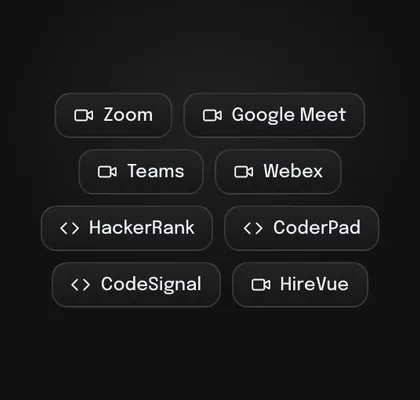
Screen share privacy works in the Windows and macOS desktop apps on these video call platforms.
-
Video calls: Zoom, Google Meet, Microsoft Teams, Webex, and Amazon Chime.
-
Live coding interviews with an interviewer on the call.
-
Check it yourself: share your screen in a test call with a friend and see what they see.
-
The web app runs in Chrome without this feature. Use it for practice and for calls where you do not share your screen.
Frequently Asked Questions
Quick answers about the InterviewStorm AI interview assistant: how it works in live calls, what it costs, and how your answers stay on your own display.
What is InterviewStorm?
InterviewStorm is a real-time AI interview assistant. It listens to the interviewer during a live video call, writes the question down, and shows you a short, structured answer within seconds. It also reads coding problems from a screenshot and helps with system design and behavioral questions. Answers are built from your resume, so they sound like you.
Is there an AI that answers interview questions in real time?
Yes. During the live call InterviewStorm listens to the interviewer, catches the question, and shows suggested talking points within seconds, so you can read them and say them in your own words. It works with Zoom, Google Meet, Microsoft Teams, and Webex.
Is InterviewStorm a free AI interview assistant?
You can start free. Every new account gets 20 free minutes of live help with every feature on, up to 15 minutes per session, with no credit card. After that, Unlimited is $30, a one-time payment for one month of unlimited use.
How much does InterviewStorm cost?
There is a free 20-minute trial with no card needed. Unlimited is $30, paid once, for one month of unlimited use: unlimited sessions with no time limit, screen share privacy in the desktop app, coding help, system design help, and answers built from your resume. There is no subscription and nothing renews. When the month ends, buy another month only if you need it.
Do you have lower prices in India and other countries?
Yes, in some countries, including India. Email support@interviewstorm.com with your country and we send you the local price and payment options. See the discounts page for details.
Do you offer a student discount?
Yes. Students get 30% off any plan with a university email address, and people who were recently laid off get 10% off. See the discounts page for how to claim it.
What does the interviewer see when I share my screen?
With the desktop app, the InterviewStorm answer window stays on your own display, like speaker notes in a presentation. It is not part of the window or screen you share on Zoom, Google Meet, Microsoft Teams, or Webex. Test it before a real interview: share your screen in a test call with a friend and look at what they see. Follow each employer's interview rules, and do not use InterviewStorm in proctored tests, exams, or anywhere AI help is not allowed.
Which apps does it work with?
Video calls on Zoom, Google Meet, Microsoft Teams, Webex, and Amazon Chime, and live coding interviews where an interviewer is on the call. For automated tests and one-way recorded interviews, follow the platform's and the employer's rules.
Does it help with coding interviews?
Yes. Capture the problem on your screen and InterviewStorm returns a working solution with the approach, edge cases, and time and space complexity. It covers Python, Java, C++, JavaScript, TypeScript, Go, SQL, and more. Use it to practice, and in live coding rounds with an interviewer where AI help is allowed.
Will the answers sound like me?
Answers are built from the resume you upload and the role you describe, so they use your real projects and numbers. They are short on purpose: key points you can say in your own words, not a script to read.
Which languages are supported?
InterviewStorm transcribes and answers in many languages, including English, Spanish, Mandarin, and Arabic. You can set the interview language and the answer language separately, and keep technical terms in English.
What do I need to run it?
The web app runs in desktop Chrome or Edge with nothing to install. The desktop app runs on Windows 10 or later, or macOS 13 or later, with 8 GB of RAM and a stable internet connection. Screen share privacy needs the desktop app.
Is there an InterviewStorm Chrome extension?
No extension is needed. The web app runs in desktop Chrome or Edge with nothing to install, which is handy for practice and for calls where you do not share your screen. For screen share privacy, use the Windows or macOS desktop app.
What is the difference between an AI interview assistant, an interview copilot, and an interview helper?
They are different names for the same kind of tool: software that listens to a live interview and suggests answers in real time. InterviewStorm does all of that in one app, with live transcription, coding help, system design help, and STAR answers built from your resume.
Does it work for phone interviews?
Yes, as long as you take the call on your computer so InterviewStorm can hear the interviewer, for example through Zoom, Teams, or a web dialer. On a regular phone call held to your ear, it has no audio to listen to.
Is there a limit on usage?
The Unlimited plan has no session limit. Each session also has no time limit, so a long interview loop is never cut off. Fair use terms apply.
Is there a subscription to cancel?
No. Unlimited is one payment for one month. Nothing renews and there is nothing to cancel. See the refund policy for when you can get your money back.
Need Help? Message Us
- A real person on our team reads every message.
- We reply by email, usually within one business day.
- Prefer email? Write to support@interviewstorm.com.