Product Design vs System Design Interview: Meta's Two Formats
- Andrew C. Lewis
- 12 Nov, 2026
- 13 Mins read
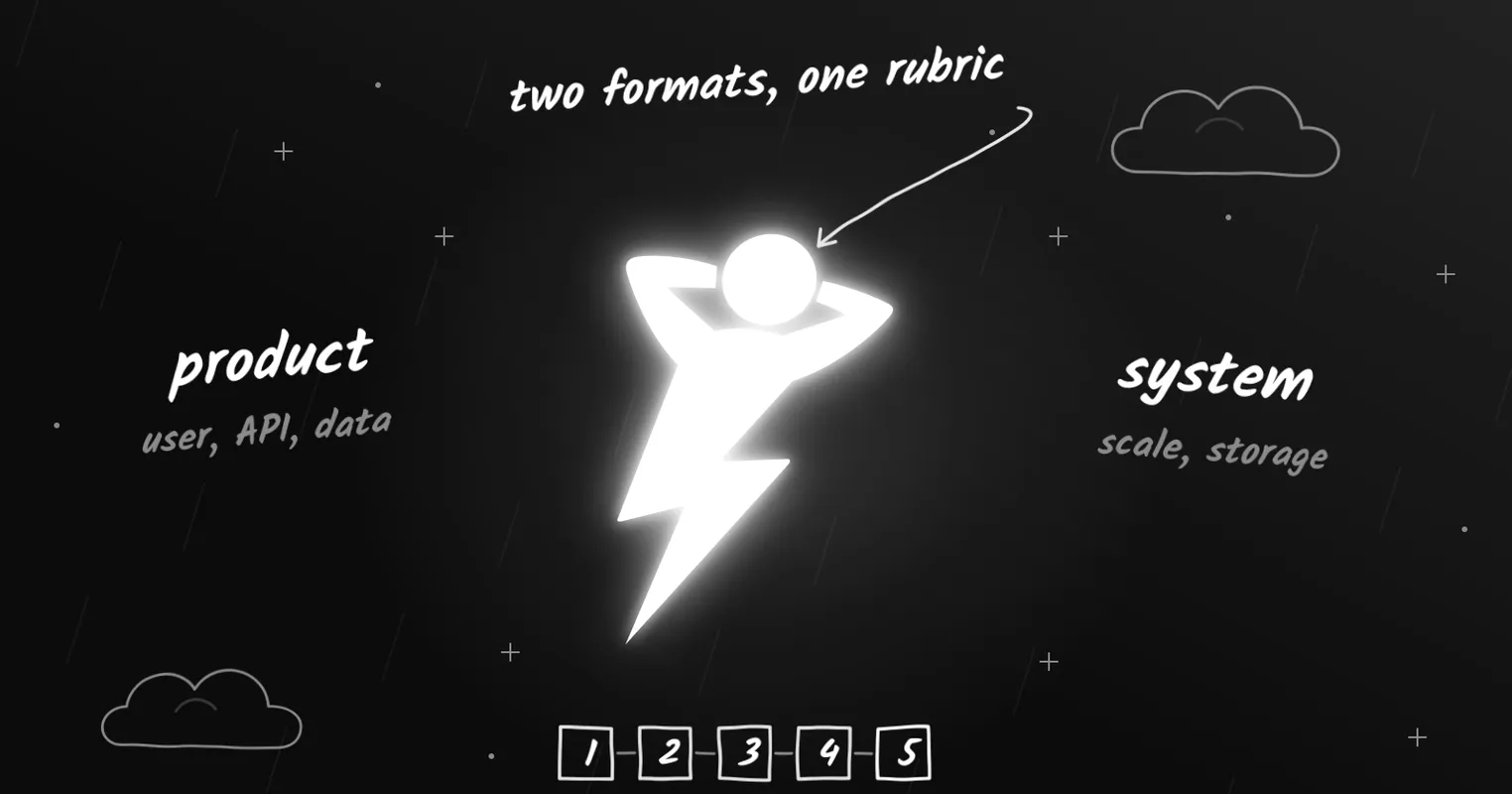
Meta’s engineering loop has two different design interviews, and candidates regularly prepare for the wrong one. Meta’s own careers page says “there are two types of design interviews: systems design and product design”, and which one you get depends “on your background” (Meta careers). Hello Interview’s guide to the Meta loop uses Meta’s current internal name for the second one, Product Architecture, and adds the part that matters for prep: “there’s significant confusion about these two interview types, even within Meta itself”, and “many interviewers don’t fully understand the distinction, and you might get similar questions in both formats” (Hello Interview, Meta E5 guide).
So you need to be ready for both, and you need to be able to tell which one you are in from the first two minutes. This post lays the two formats side by side, answers one prompt both ways with diagrams, and ends with what other companies call their version of the round. The 45-minute shape and the words to say at each step are in the system design interview framework; this post is about which answer to put inside that shape.
The two formats in one place
What the sources agree on:
- Which track gets which. Software Engineer, Infrastructure candidates get a System Design interview. Software Engineer, Product candidates get a Product Architecture interview. “The choice is based on the role you’re interviewing for” (Hello Interview, Meta E5 guide). From E4 up, the loop has one design round and one behavioral round, plus two coding rounds (Hello Interview, Meta E4 guide).
- Same length, same tool. Both are 45 minutes. “The design interview is 45 minutes long” and “these almost never involve coding” (Meta careers). Both use Excalidraw as the whiteboard (Hello Interview, Meta E5 guide; Excalidraw).
- Same four grading areas. Problem Navigation (turning a vague prompt into a scoped problem and steering through it), Solution Design (a design that works and balances performance, scalability, maintainability and cost), Technical Excellence (depth on the parts that matter), and Technical Communication (explaining the design so the interviewer can follow). “Both interview types evaluate the same four competencies” (Hello Interview, Meta E5 guide).
- Same weight. At E5 “the system design and behavioral interviews carry the most weight for determining your final level and hire decision” (Hello Interview, Meta E5 guide); at E4 the design and behavioral rounds “carry the most weight for level determination” (Hello Interview, Meta E4 guide).
What differs is where the answer starts and what the interviewer pushes on.
Product Architecture (product design) is “almost always a user facing product question”. The focus “is more so on API design”, with user experience flows, data modelling and client-server interactions, though you will “still design the full backend of the system in the majority of cases” (Hello Interview, Meta E5 guide). You start from the user and work inward: what the person does, what the screen shows in each state, which entities exist, which API calls the client makes, and what the user sees right after each action. Scale and infrastructure come last, and only as far as the product needs.
System Design “focuses more on infrastructure and backend components”: backend architecture, scalability challenges, database design (Hello Interview, Meta E5 guide). You start from scale, storage and the pipeline and work outward: how much data, where it comes from, how it is stored and moved, where it breaks, and only then the API the client calls.

The same four competencies are graded in both, but through different evidence. In Product Architecture, Technical Excellence is shown by a clean API and a data model that makes the client simple. In System Design, it is shown by the number that picks a component and a deep dive on where the pipeline breaks.
One prompt, two answers
The prompt: “Design a price-drop alert for an online store. A shopper sets a target price on a product and gets notified when the price falls to or below it.”
This is a good prompt because it is genuinely both. It has a user flow with states, and it has a pipeline that can be enormous. Below is the first 25 minutes of each answer, the part where the two formats differ most. The last 20 minutes (deep dives, trade-offs, wrap up) follow the same clock in both and are covered in the framework post.
The product design answer
Requirements (0 to 5 minutes). Start from the shopper.
What to say: “The user is a shopper on a product page. They tap ‘Alert me’, optionally set a target price, and leave. When the price drops to the target, they get a push notification or email, tap it, and land on the product at the new price. They can see their alerts in one list and delete any of them. Out of scope: alerts on categories, price history charts, and sharing. Is that the product you had in mind?”
Then the non-functional requirements (how well the system behaves, rather than what it does) as the user feels them: the alert should appear in their list at once; the notification should arrive within minutes of the drop, not seconds; and they must never get two notifications for the same drop.
Entities and API (5 to 12 minutes). This is where the product round spends its time, so draw the entities first.
- User. Id, email, push token.
- Product. Id, name, current price, image.
- Alert. Id, user id, product id, target price, status (watching, triggered, expired), created at, triggered at.
- PriceHistory. Product id, price, changed at. Needed so the notification can say “was 100, now 75”.
The API, from the client’s point of view:
POST /alertswith product id and target price. Returns the alert with status “watching”.GET /alertsreturns the user’s alerts with each product’s current price, so the list screen is one call.DELETE /alerts/{id}.- The client never asks “has the price dropped?”. The server tells it, through a notification, and the alert’s status changes.
Client states (12 to 18 minutes). Product interviewers want to see that you have thought about the screen.
- The button on the product page has four states: no alert (“Alert me”), watching (“Watching, under 80”), triggered (“Alert sent, now 75”), and expired (the product is gone or the alert is 90 days old).
- The alerts list sorts triggered alerts first, because the user opened the app to act on one.
- The notification deep-links to the product page with the alert id in the link, so the page can show “you wanted 80” next to the new price.

What the user sees, step by step (18 to 25 minutes). Walk one alert through its life. This is the product round’s version of “trace one request”.
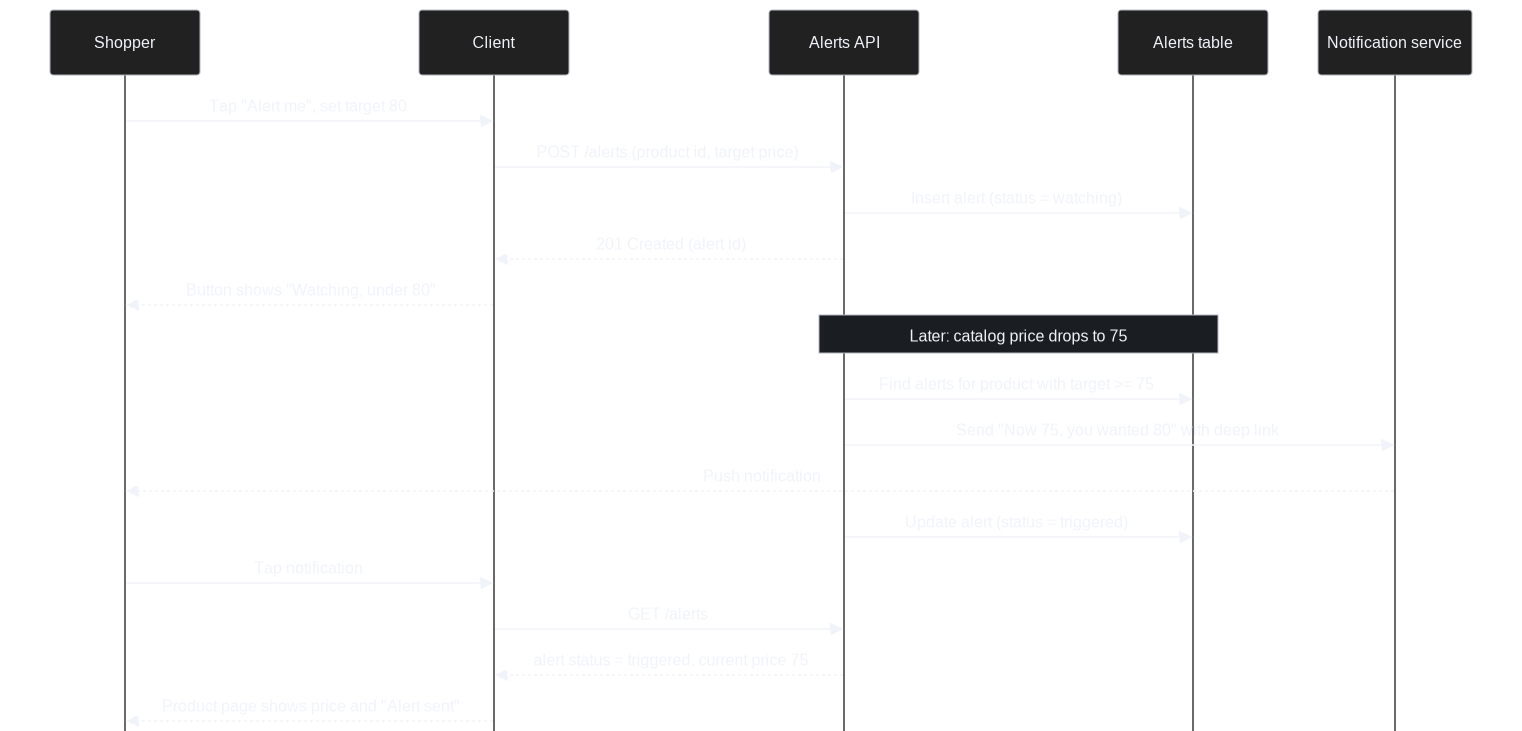
What to say: “The shopper sets a target of 80. The client posts the alert, the server stores it as watching, and the button changes at once because the response came back. That is the consistency the user cares about: their own action is visible immediately. Later the catalog drops the price to 75. The server finds every alert on that product with a target at or above 75, sends each one a push with a deep link, and marks it triggered. The shopper taps the push, the client reloads the alert list, and the page shows 75 with ‘Alert sent’. If the price goes back up before they tap, the page shows the current price and says the alert was for 75, so the notification never looks like a lie.”
Then the consistency rule, said plainly: the user’s own writes are read-your-own-writes (you always see what you just did), and everyone else’s updates are allowed to lag by a minute or two. One product-level trade-off closes the section: “I will not notify on every tick down. One notification per alert, then it is done, because repeated pushes are the fastest way to get the app uninstalled.”
Only now, at minute 25, does the backend get drawn, and only as far as “an alerts table, a price-change hook from the catalog, and a notification service”. If the interviewer wants the pipeline, the system design answer below is where you go.
The system design answer
Requirements (0 to 5 minutes). Same product, but the questions are about volume.
What to say: “The product is a price-drop alert. The questions that shape the design are: how many alerts exist, how many price changes happen a day, how fast a notification must follow the change, and whether a single product can have a huge number of watchers. I will assume a large store: 50 million shoppers with alerts, five alerts each, 100 million products, and that a sale event can reprice a large part of the catalogue within an hour. Notification within five minutes is fine. Never notify twice for one drop. Is that the scale you want?”
The numbers (5 to 10 minutes). Calculate the ones that pick a component, as in back-of-the-envelope estimation.
- Alerts: 50 million users times 5 is 250 million alert rows. At about 100 bytes each that is 25 GB. One database holds it; the question is the matching, not the size.
- Price changes on a normal day: if 2% of 100 million products reprice, that is 2 million changes a day, about 20 a second over a 100,000-second day. Trivial.
- Price changes on a sale day: if 50 million products reprice within an hour, that is about 14,000 changes a second for that hour. This is the number that picks a component. Matching cannot be a synchronous call from the catalog; it needs a buffer.
- Fan-out: a product with a million watchers produces a million notifications from one event. Delivery needs a queue and workers, and the matcher must not try to send them itself.
What to say: “Normal days are nothing. The sale hour is around 14,000 price changes a second, and a hot product can fan out to a million notifications. So the design is a pipeline: price changes into a partitioned event log, matcher workers reading it, and a separate notification queue for delivery. For reference, a single Kafka broker sustains about 200 MB per second (Confluent), and a price-change event is a few hundred bytes, so the log is not the bottleneck; the matching and the pushes are.”
High-level design (10 to 22 minutes). Draw the pipeline.

The parts, in order:
- Ingestion. Prices live in the catalog database. Instead of asking the catalog team to call us, read its change stream with change data capture (a tool that turns every database row change into an event, Debezium) and write price changes into an event log (a durable, replayable queue such as Kafka) keyed by product id. Keying by product id means all changes for one product land in one partition, in order (Kafka docs).
- Alert index. The alerts table is the source of truth, but matching against 250 million rows on every price change is too slow. Keep a read-optimised index: for each product id, the list of alert ids sorted by target price. A price drop to 75 reads one product’s list and takes every entry with target 75 or higher, which is a range scan, not a filter. The API writes to the table and to the index; if the index is stale by a few seconds, a shopper’s new alert is matched a few seconds late, which is acceptable.
- Matcher workers. One worker per partition reads price changes, looks up the index, and writes one notification job per matched alert to the notification queue. For a million-watcher product it writes a million jobs in batches and moves on; it does not call any provider.
- Notification queue and delivery workers. Exactly the notification system from the framework post: at-least-once delivery, a dedupe key of alert id plus price so a retry never sends twice, retries with backoff, a dead-letter queue, and a delivery log. Uber’s push platform handles 250,000 messages a second (Uber Engineering, 2020), so a million pushes over a few minutes is an ordinary load for a well-built delivery tier.
Walk one price change through it (22 to 25 minutes). “The catalog drops product 42 to 75. Change data capture emits the event onto the partition for product 42. The matcher for that partition reads the alert index for product 42, finds 300,000 alerts with target 75 or above, and writes 300,000 jobs to the notification queue in batches of a thousand. Delivery workers pull jobs, check the dedupe set for alert id plus price 75, send the push, and log it. The alerts table is updated to triggered by the same worker, after the send.”
The deep dives that follow (minutes 25 to 38) are the system round’s: what happens when the price drops twice in a minute (the second event matches a smaller set; dedupe by alert id plus price keeps the first push from repeating and allows a second push for the lower price, or you suppress by alert id for 24 hours, a product decision to state); how the index is rebuilt if it drifts (replay the event log); and what the hot partition for a product with a million watchers does to the matcher (batch the writes, or split the fan-out across several workers by alert id range).
What the interviewer pushes on in each
Same prompt, different follow-ups:
- Product Architecture: “What does the list screen show while the price is being checked?” “What if the user has 200 alerts?” “How does the notification deep link work if the app is not installed?” “What if the user changes the target price?” Every one is about the user’s experience and the API that serves it.
- System Design: “What if the catalog reprices everything at once?” “How do you keep the index in sync with the table?” “What is the p99 from price change to push?” (p99 is the time within which 99 out of 100 cases finish.) “What happens when the push provider is down for an hour?” Every one is about volume, storage and failure.
If you get the product follow-ups in a round you prepared as system design, do not fight it. Draw the entity list and the client states; you have the backend already. If you get the system follow-ups in a product round, say the number and draw the queue. Hello Interview’s warning that “you might get similar questions in both formats” means the interviewer may be grading you on the other rubric without saying so.
How to tell which one you are in
You can usually tell within two minutes, from the prompt and the first follow-up.
- The prompt names a product feature a user touches (an alert, a story, a marketplace listing, a group chat) and the interviewer asks “who is the user?” or “what does the screen show?” early: product design.
- The prompt names a system or a scale (a notification pipeline, a rate limiter, “at Meta scale”) and the interviewer asks “how many?” or “where does the data live?” early: system design.
- The interviewer asks for the API before the architecture: product design. Asks for the numbers before the API: system design.
- A test you can run yourself. Say, at minute two, “I will start from the user flow and the API, then do the backend. Or would you rather I start from scale and storage?” The answer tells you the format, and asking it counts toward Problem Navigation rather than against it.
What to ask the recruiter before the loop, in these words: “Is my design round System Design or Product Architecture, and which track is the role on?” Hello Interview’s guides tie the format to the track, so the recruiter can answer. If the answer is “it depends on the interviewer”, prepare the product answer first and the pipeline second, because the product round still asks for “the full backend of the system in the majority of cases” and the reverse is less common.
Other companies’ names for the same rounds
Meta is the only big company with two named formats on the research sources for this series. The others run one design round, and the difference is where it sits and what it is graded on.
- Amazon puts the design question inside the ordinary interview slot. The SDE II loop is “four 55-minute interviews”, and candidates should “expect at least one question on software systems design”, in the same slot as two or three behavioral questions about the Leadership Principles (amazon.jobs). The page lists six objectives for the design question: Practicality, Accuracy, Efficiency, Reliability, Optimization, Scalability. At SDE I (L4) the design round “covers object oriented design instead of large scale systems” (Hello Interview, Amazon L4 guide). Amazon’s list reads like a system design rubric, so prepare the pipeline answer, but keep it short enough to leave time for the behavioral questions.
- Google runs a single format. At L5 “you’ll spend 45 minutes designing a large scale distributed system from scratch” on “a virtual whiteboard, shared diagramming tool, or Google Docs”, graded on three aspects: Architectural Design Skills, Trade-offs and Deep Technical Knowledge, and Communication and Requirements Analysis (Hello Interview, Google L5 guide). There is “no dedicated system design round at L4” (Hello Interview, Google L4 guide). Google’s round is the system design answer, every time.
- Netflix runs a 60-minute design round in its senior loop (Blind, July 2025), which gives time for both the product-level flow and the pipeline.
For which levels get a design round at all, and what a junior is graded on, see system design interviews for junior engineers.
Preparing for both in one week
If you do not know which format you will get, this split covers both without doubling the work:
- Take three prompts from the 20 system design interview questions that are user-facing products: a news feed, a chat app, a booking app. For each, do the product answer first (entities, API, client states, what the user sees), 25 minutes on a timer.
- Then do the system answer for the same prompt: one number, the pipeline, one deep dive. Another 25 minutes.
- Notice which half you reached for first without thinking. That is your default, and the other half is the one to drill.
- Read the mistakes post for the feedback phrases, because “too high level” in a product round usually means a thin API, and in a system round it usually means a box labelled “cache” with nothing inside it.
- Keep the cheat sheet open for the building blocks; the pipeline half of every answer is built from the same eight of them.
How InterviewStorm helps
InterviewStorm is a practice partner for both of Meta’s design formats, and useful precisely because it does not care which one you are in. Describe the prompt in a mock call and it gives back the full answer: the requirements to clarify, the number that matters, an architecture diagram it draws itself, the request flow, the schema and APIs, the scaling moves, and the trade-offs to name. Run the same prompt twice, once asking for the product answer and once for the pipeline, and compare the two against your own. See the system design feature.
Most companies do not allow AI help during the design round itself, and interviewers say they watch for it. Use it where the employer allows it, and to practise everywhere else. Follow each employer’s interview rules. Do not use InterviewStorm in proctored tests, exams, or anywhere AI help is not allowed.
The free trial is 20 minutes in total, up to 15 minutes per session, with no credit card. Try it free.
For the rest of the loop, read the guides on coding interviews and the STAR method.
Share Articles:
Similar Posts