
Set up your resume so answers sound like you
Upload or type your resume so InterviewStorm writes answers based on your real experience.
Help Center / Getting started
Upload or type your resume so InterviewStorm writes answers based on your real experience.
InterviewStorm uses your resume to write answers. With a good resume, answers talk about your real jobs, skills, and projects. Without one, answers are more general.
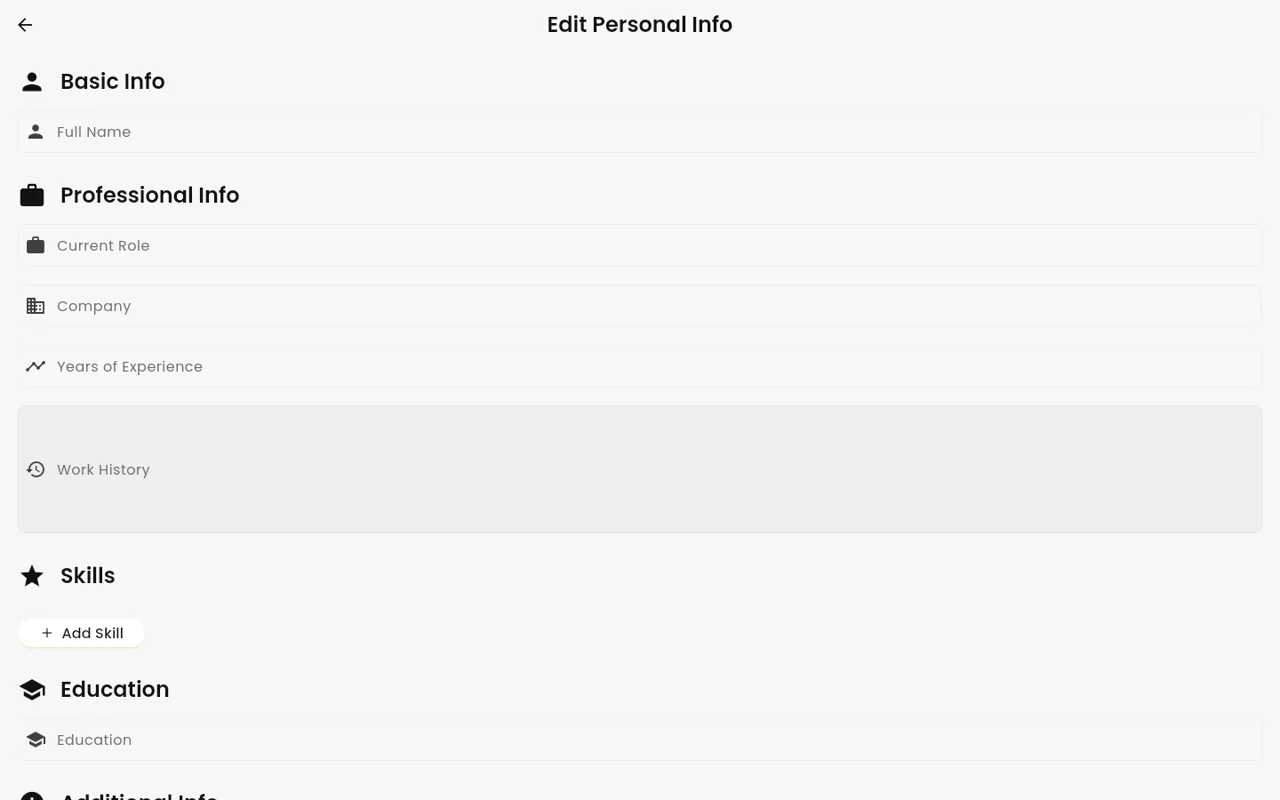
Upload your resume
- During setup, or later in your profile, choose to upload a resume.
- Pick a PDF file. It can be up to 10 MB.
- Wait a moment. The AI reads the file and fills in your profile for you.
- Check each part. Fix anything that is wrong or missing.
The AI fills in these parts:
- Name
- Professional summary (a few lines about who you are at work)
- Work experience
- Skills
- Projects
- Education
- Extra context (anything else you want the AI to know, like a career change)
Type it by hand
You do not need a PDF. You can add each part by hand instead. You can also skip this step and come back later.
Tips for better answers
- Add numbers you are proud of, like “cut load time by half”.
- Add the tools and languages you really use.
- Use “Extra context” for things not on your resume. For example, the company you are interviewing with, or why you want the job.
- Keep it true. The answers can only be as good as what you give.
More than one resume
You can keep several resumes. This helps if you apply to different kinds of jobs.
- You can edit, rename, delete, or set a resume as active.
- With two or more resumes, the app shows “Choose a resume” before each interview. Pick the one that fits the job.
Remove your resume data
To remove everything from your profile, use “Clear all CV data”. CV means resume. To learn what is stored, see What InterviewStorm stores and what it does not.
Set the interview type
During setup you also type the interview type. Use a short job title, like “Senior Android Engineer”. This helps the AI choose the right kind of answer.
Next step: Your first session, step by step.